 NEKKO AGENT
Docs
NEKKO AGENT
Docs
Using Nekko Agent
Accounts and switching
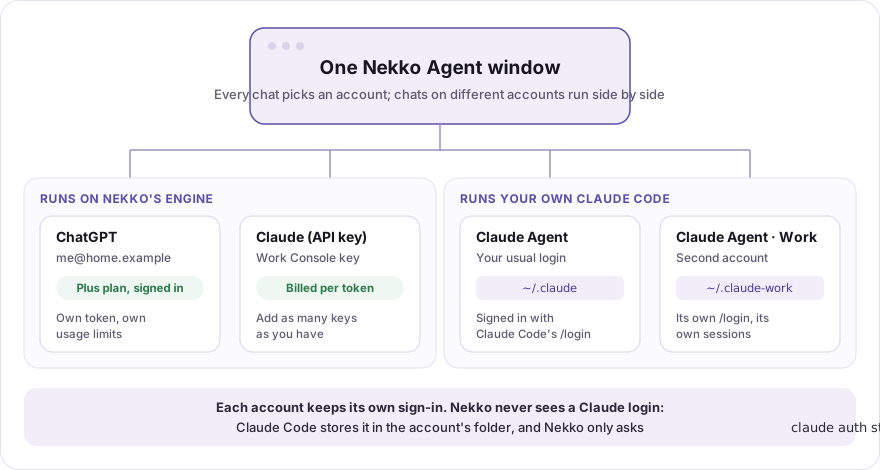
Nekko Agent can hold as many accounts as you have, for any provider: two ChatGPT plans, a personal and a work Anthropic API key, an OpenRouter key, a Bedrock account, and two Claude Code logins, all in one window. Every chat picks its account, chats on different accounts run side by side, and you can move a chat to another account in one click.
What counts as an account
Each account is a provider on the Models page. Adding a second one of the same kind gives you a second account:
| Provider | How you add another account | How Nekko tells them apart |
|---|---|---|
| ChatGPT plan | Sign in with ChatGPT again, with the other account | The email the plan is signed in as |
| Anthropic, OpenAI, OpenRouter API key | Add provider again with the other key | The label you give it |
| Bedrock, Vertex, Foundry | Add provider again with the other account's credentials | The label you give it |
| Claude subscription (your Claude Code) | Add provider → Claude → Subscription → + Another subscription account | The account name you give it, plus the email and plan Claude Code reports |
Local model servers (Ollama, LM Studio, vLLM, the built-in engine) are computers, not accounts, so they never get a switcher.
Switching accounts
When the chat's provider has more than one account, the model picker opens with an Account row at the top. Click another account and the chat moves to the same model on that account. An account greys out when it does not offer the chat's model.
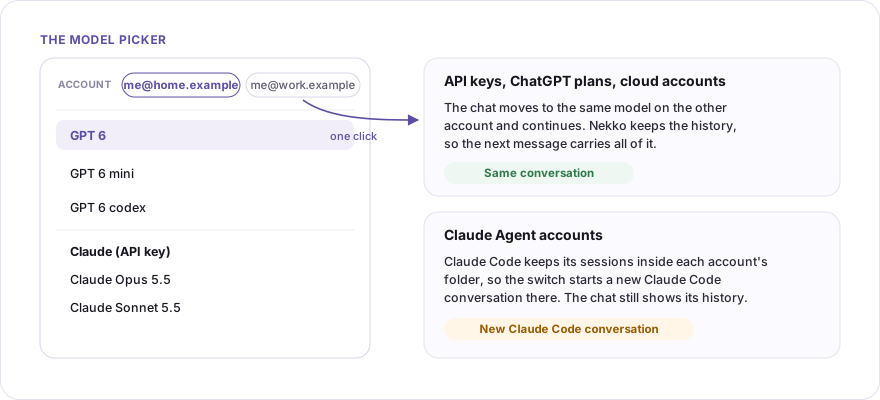
- API keys, ChatGPT plans and cloud accounts run on Nekko's own engine, which keeps the chat's history. The next message goes out on the new account with the whole conversation, as if it had been there all along.
- Claude subscription accounts run your own Claude Code, which keeps its sessions inside each account's folder. A switch therefore starts a new Claude Code conversation on the other account: the chat still shows everything above, but Claude Code on the new account does not see it. Switching back later starts another new one.
- New chats start on the account you used last. To pin one, right-click a model in the picker and choose Set as default.
Nekko does not switch accounts on its own unless you ask it to: in a chat on ✨ Auto you can turn on Follow capacity & cost, and then a turn whose provider is spent runs on an equivalent model on another provider, which can be another of your accounts. Claude subscription accounts are never part of that: Auto never moves a turn onto a Claude plan, and a Claude subscription chat has no Auto. When a Claude subscription account hits its plan limit, the chat says so and waits for you.
Several Claude accounts
Claude is one provider with two kinds of account, and the Models page keeps them together in a Claude group. Each card says where it comes from:
Subscription · Claude Code 2.1.263 · ~/.claude-work · you@work.com · Team plan: a Claude plan, through Claude Code on this computer.API · Anthropic API key, orAPI · Amazon Bedrock · us-east-1: an API or cloud account Nekko calls directly.
API accounts (an Anthropic API key, or Bedrock, Vertex or Foundry) work like any other API provider: choose Add provider → Claude → API → Connect once per key or cloud account.
Subscription accounts run the Claude Code you already have installed. Each one is a separate Claude Code login:
- On the Models page, choose Add provider → Claude, then the Subscription column. Your usual Claude Code login connects first.
- Choose + Another subscription account and give it a name, such as
Work. Nekko shows the folder Claude Code will keep that login in:~/.claude-work. - Choose Sign in to Work. A terminal opens inside the panel with Claude Code running on that folder. Type
/loginand finish signing in with Anthropic, in Claude Code's own flow. - Nekko reads who the new login is (
claude auth statusprints its email, organization and plan) and checks it against the accounts you already have:- A different person or organization (say, your company's Team seat beside your personal Max plan): Add Work is ready.
- Another personal plan beside a personal plan you already connected: Nekko explains that Anthropic's plan limits "assume ordinary, individual usage" and asks you to confirm the account is for separate work, not for adding up your limits, before Add turns on.
- The same login again (same email and organization as an account you already connected): Nekko won't add it. A second copy of one login could only be used to rotate between them around plan limits, which Anthropic's terms rule out. Sign in with a different account instead.
Your usual login (~/.claude) stays as it was, so the first subscription account keeps working. The folder is an ordinary Claude Code config folder, the one Claude Code's documented CLAUDE_CONFIG_DIR variable points at, so you can use the same account from any terminal:
CLAUDE_CONFIG_DIR=~/.claude-work claudeWhat Nekko does and does not touch. Nekko starts Claude Code with CLAUDE_CONFIG_DIR set to the account's folder, and asks claude auth status whether it is signed in, and as whom (email, organization and plan, which the CLI prints itself). It never opens the folder, never reads or copies the login inside it, never sets a token, and never changes the Claude Code binary. The folder name comes only from the account name (a-z, 0-9 and -), never from a path you type.
Usage. Claude Code shows each account's plan usage itself (/usage). Nekko shows none for a Claude plan, because Anthropic has no approved way for another app to read it.
What Anthropic allows
Anthropic's rules for Claude Code (Legal and compliance) separate two things: you signing in to the unmodified Claude Code with your own plan, which is allowed even when another app runs Claude Code for you, and an app offering Claude sign-in or handling Claude credentials, which is not. Nekko is built on the first and does none of the second.
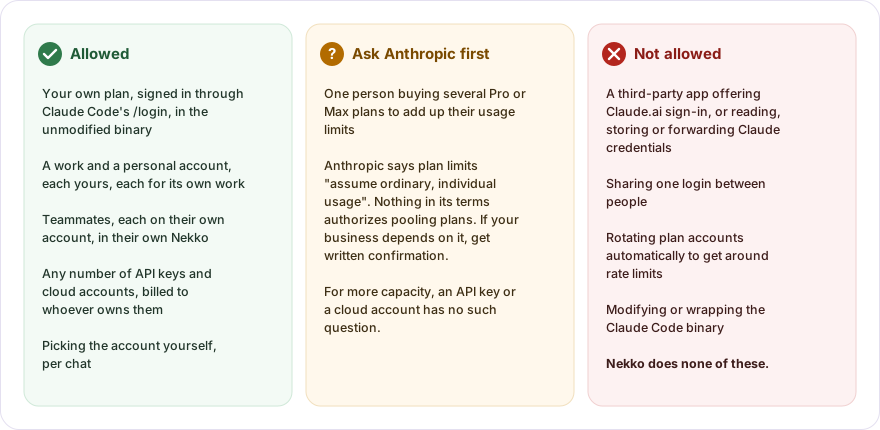
| What you want to do | Allowed? | Notes |
|---|---|---|
| Use your own Claude plan through the Subscription option | Yes | You sign in inside Claude Code with /login; Nekko never sees the login. |
| Keep a work and a personal Claude account, each for its own work | Yes | Each is a separate subscription account with its own login. |
| Teammates each using their own account | Yes | Each person signs in to their own Claude Code, in their own Nekko. |
| Any number of API keys or cloud accounts | Yes | Billed to whoever owns each key or account. Every Nekko feature works on them. |
| One person buying several Pro or Max plans to add up their limits | Ask Anthropic first | Anthropic says plan limits "assume ordinary, individual usage". Nothing in its terms authorizes pooling plans, so treat it as a gray area and get written confirmation before a business depends on it. Nekko asks you to confirm a second personal plan is for separate work before adding it. An API key or a cloud account has no such question. |
| Switch Claude accounts automatically when one runs out | No | Getting around rate limits is a compliance risk. Nekko only switches when you click. |
| Add the same Claude login twice | No | Nekko refuses it: two copies of one login only serve to rotate around plan limits. |
| Share one Claude login between people | No | Anthropic's consumer terms forbid sharing account credentials. |
| Sign in to Claude inside a third-party app, or let it read your Claude Code credentials | No | Nekko removed its old Claude plan sign-in for this reason; see Subscription sign-in. |
This page describes how Nekko works, not legal advice. If something matters to your business, ask Anthropic.
Accounts on another computer
Nekko runs Claude Code on the computer it runs on. To use an account that lives on another machine (for example Claude Code inside WSL on a Windows desktop), open a terminal to it from Terminal → SSH hosts and run claude there: it appears as a terminal tab in the same window, with that machine's login, but not as a Nekko chat. Running a Claude subscription chat on another computer, with its approvals and transcript in this window, is not built yet.
Your phone works the other way round: it drives the Nekko on your computer, with whatever accounts that computer has. See Phone remote control.